

Welcome to the BeeGFS download page.
Before you start downloading BeeGFS, please fill out the form below.
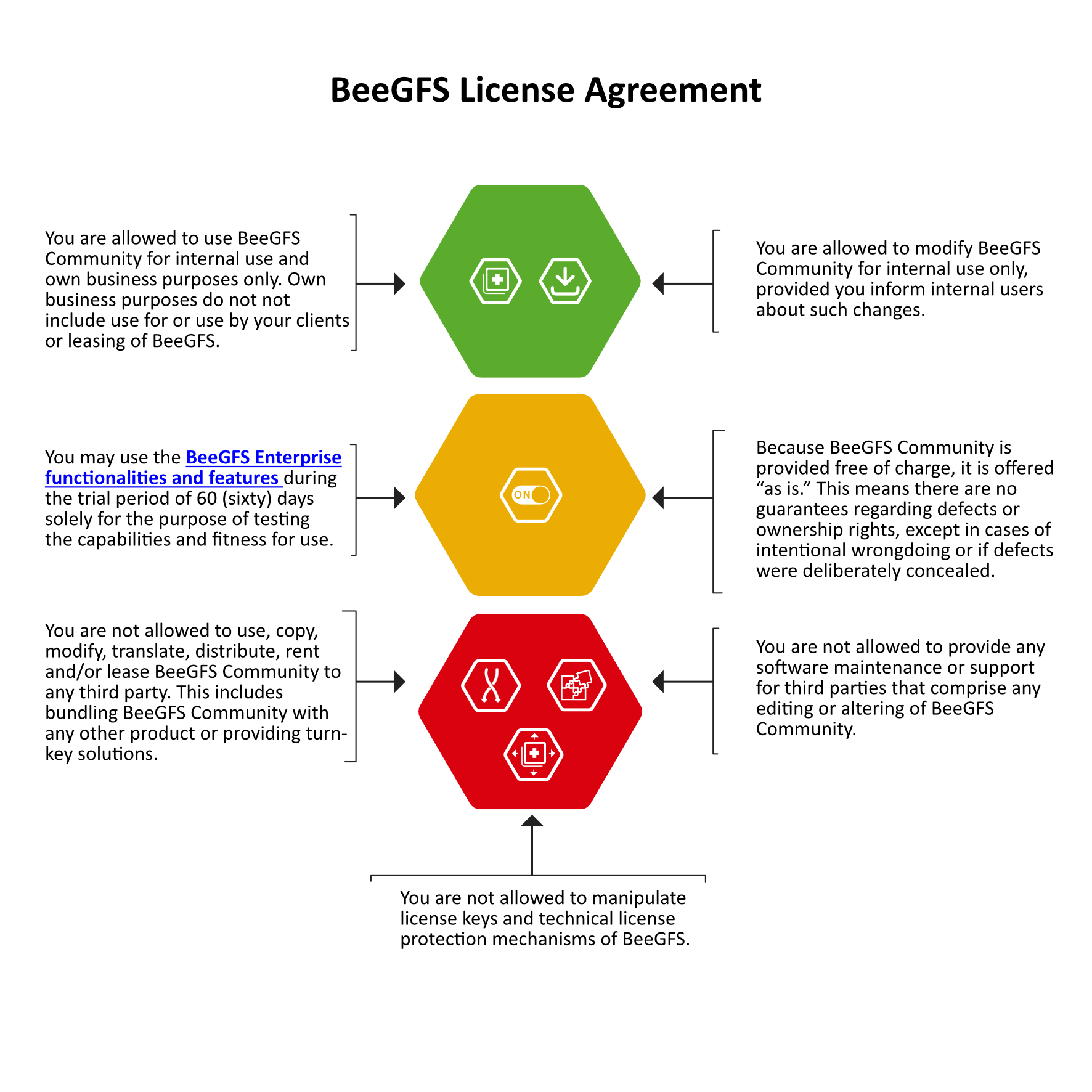
Prior to any use of or work with the BeeGFS Community edition — including copying, modifying, translating, renting, leasing, distributing, and/or supporting it — please read the BeeGFS License Agreement. By using or working with the BeeGFS Community edition, you accept all terms and conditions of the BeeGFS License Agreement. Do not download, install, copy, use or work with the BeeGFS Community edition if you do not agree to the terms and conditions of the BeeGFS License Agreement. Any use of BeeGFS outside the scope of the BeeGFS License Agreement requires a commercial license; please contact sales@thinkparq.com for further information.
We appreciate your interest in downloading BeeGFS
Before you get started, we highly recommend that you familiarize yourself with the BeeGFS Documentation. The BeeGFS client module is licensed under the GPLv2.
BeeGFS v8.3 for Red Hat Enterprise Linux 10
Binary packages are available for Red Hat Enterprise Linux / Rocky Linux / AlmaLinux 10.
Warning: Before upgrading to this version, make sure to read our upgrade guide very carefully to make sure all the prerequisites are met for the upgrade to proceed smoothly.
Configure Package Repository
BeeGFS repositories and packages are digitally signed. The fingerprint of our signing key is 0683 AF2B 9AC5 BC7D 59B2 D623 40CE 4E24 3CD5 0804.
To verify the package signatures, add the public BeeGFS GPG key to your package manager:
rpm --import https://www.beegfs.io/release/beegfs_8.3/gpg/GPG-KEY-beegfs
then download the repository file:
wget https://www.beegfs.io/release/beegfs_8.3/dists/beegfs-rhel10.repo \

-O /etc/yum.repos.d/beegfs.repo
You can now install BeeGFS via your package manager.
Please refer to the documentation for details on how to install and configure BeeGFS, and see also the Changelog as well as the Upgrade Notes.
Manual Download
Individual rpm packages can be downloaded by browsing the online Repository.
BeeGFS v8.3 for Red Hat Enterprise Linux 10
Binary packages are available for Red Hat Enterprise Linux / Rocky Linux / AlmaLinux 10.
Warning: Before upgrading to this version, make sure to read our upgrade guide very carefully to make sure all the prerequisites are met for the upgrade to proceed smoothly.
Configure Package Repository
BeeGFS repositories and packages are digitally signed. The fingerprint of our signing key is 0683 AF2B 9AC5 BC7D 59B2 D623 40CE 4E24 3CD5 0804.
To verify the package signatures, add the public BeeGFS GPG key to your package manager:
rpm --import https://www.beegfs.io/release/beegfs_8.3/gpg/GPG-KEY-beegfs
then download the repository file:
wget https://www.beegfs.io/release/beegfs_8.3/dists/beegfs-rhel10.repo \

-O /etc/yum.repos.d/beegfs.repo
You can now install BeeGFS via your package manager.
Please refer to the documentation for details on how to install and configure BeeGFS, and see also the Changelog as well as the Upgrade Notes.
Manual Download
Individual rpm packages can be downloaded by browsing the online Repository.
BeeGFS v8.3 for Red Hat Enterprise Linux 9
Binary packages are available for Red Hat Enterprise Linux / Rocky Linux / AlmaLinux 9.
Warning: Before upgrading to this version, make sure to read our upgrade guide very carefully to make sure all the prerequisites are met for the upgrade to proceed smoothly.
Configure Package Repository
BeeGFS repositories and packages are digitally signed. The fingerprint of our signing key is 0683 AF2B 9AC5 BC7D 59B2 D623 40CE 4E24 3CD5 0804.
To verify the package signatures, add the public BeeGFS GPG key to your package manager:
rpm --import https://www.beegfs.io/release/beegfs_8.3/gpg/GPG-KEY-beegfs
then download the repository file:
wget https://www.beegfs.io/release/beegfs_8.3/dists/beegfs-rhel9.repo \

-O /etc/yum.repos.d/beegfs.repo
You can now install BeeGFS via your package manager.
Please refer to the documentation for details on how to install and configure BeeGFS, and see also the Changelog as well as the Upgrade Notes.
Manual Download
Individual rpm packages can be downloaded by browsing the online Repository.
BeeGFS v8.3 for Red Hat Enterprise Linux 9
Binary packages are available for Red Hat Enterprise Linux / Rocky Linux / AlmaLinux 9.
Warning: Before upgrading to this version, make sure to read our upgrade guide very carefully to make sure all the prerequisites are met for the upgrade to proceed smoothly.
Configure Package Repository
BeeGFS repositories and packages are digitally signed. The fingerprint of our signing key is 0683 AF2B 9AC5 BC7D 59B2 D623 40CE 4E24 3CD5 0804.
To verify the package signatures, add the public BeeGFS GPG key to your package manager:
rpm --import https://www.beegfs.io/release/beegfs_8.3/gpg/GPG-KEY-beegfs
then download the repository file:
wget https://www.beegfs.io/release/beegfs_8.3/dists/beegfs-rhel9.repo \

-O /etc/yum.repos.d/beegfs.repo
You can now install BeeGFS via your package manager.
Please refer to the documentation for details on how to install and configure BeeGFS, and see also the Changelog as well as the Upgrade Notes.
Manual Download
Individual rpm packages can be downloaded by browsing the online Repository.
BeeGFS v8.3 for Red Hat Enterprise Linux 8
Binary packages are available for Red Hat Enterprise Linux / Rocky Linux / AlmaLinux 8.
Warning: Before upgrading to this version, make sure to read our upgrade guide very carefully to make sure all the prerequisites are met for the upgrade to proceed smoothly.
Configure Package Repository
BeeGFS repositories and packages are digitally signed. The fingerprint of our signing key is 0683 AF2B 9AC5 BC7D 59B2 D623 40CE 4E24 3CD5 0804.
To verify the package signatures, add the public BeeGFS GPG key to your package manager:
rpm --import https://www.beegfs.io/release/beegfs_8.3/gpg/GPG-KEY-beegfs
then download the repository file:
wget https://www.beegfs.io/release/beegfs_8.3/dists/beegfs-rhel8.repo \

-O /etc/yum.repos.d/beegfs.repo
You can now install BeeGFS via your package manager.
Please refer to the documentation for details on how to install and configure BeeGFS, and see also the Changelog as well as the Upgrade Notes.
Manual Download
Individual rpm packages can be downloaded by browsing the online Repository.
BeeGFS v8.3 for Red Hat Enterprise Linux 8
Binary packages are available for Red Hat Enterprise Linux / Rocky Linux / AlmaLinux 8.
Warning: Before upgrading to this version, make sure to read our upgrade guide very carefully to make sure all the prerequisites are met for the upgrade to proceed smoothly.
Configure Package Repository
BeeGFS repositories and packages are digitally signed. The fingerprint of our signing key is 0683 AF2B 9AC5 BC7D 59B2 D623 40CE 4E24 3CD5 0804.
To verify the package signatures, add the public BeeGFS GPG key to your package manager:
rpm --import https://www.beegfs.io/release/beegfs_8.3/gpg/GPG-KEY-beegfs
then download the repository file:
wget https://www.beegfs.io/release/beegfs_8.3/dists/beegfs-rhel8.repo \

-O /etc/yum.repos.d/beegfs.repo
You can now install BeeGFS via your package manager.
Please refer to the documentation for details on how to install and configure BeeGFS, and see also the Changelog as well as the Upgrade Notes.
Manual Download
Individual rpm packages can be downloaded by browsing the online Repository.
BeeGFS v8.3 for Debian 13
Binary packages are available for Debian 13.
Warning: Before upgrading to this version, make sure to read our upgrade guide very carefully to make sure all the prerequisites are met for the upgrade to proceed smoothly.
Configure Package Repository
BeeGFS repositories and packages are digitally signed. The fingerprint of our signing key is 0683 AF2B 9AC5 BC7D 59B2 D623 40CE 4E24 3CD5 0804.
To verify the package signatures, add the public BeeGFS GPG key to your package manager:
wget https://www.beegfs.io/release/beegfs_8.3/gpg/GPG-KEY-beegfs -O /etc/apt/trusted.gpg.d/beegfs.asc
then download the repository file:
wget https://www.beegfs.io/release/beegfs_8.3/dists/beegfs-trixie.list \

-O /etc/apt/sources.list.d/beegfs.list

apt install apt-transport-https

apt update
You can now install BeeGFS via your package manager.
Please refer to the documentation for details on how to install and configure BeeGFS, and see also the Changelog as well as the Upgrade Notes.
Manual Download
Individual deb packages can be downloaded by browsing the online Repository.
BeeGFS v8.3 for Debian 13
Binary packages are available for Debian 13.
Warning: Before upgrading to this version, make sure to read our upgrade guide very carefully to make sure all the prerequisites are met for the upgrade to proceed smoothly.
Configure Package Repository
BeeGFS repositories and packages are digitally signed. The fingerprint of our signing key is 0683 AF2B 9AC5 BC7D 59B2 D623 40CE 4E24 3CD5 0804.
To verify the package signatures, add the public BeeGFS GPG key to your package manager:
wget https://www.beegfs.io/release/beegfs_8.3/gpg/GPG-KEY-beegfs -O /etc/apt/trusted.gpg.d/beegfs.asc
then download the repository file:
wget https://www.beegfs.io/release/beegfs_8.3/dists/beegfs-trixie.list \

-O /etc/apt/sources.list.d/beegfs.list

apt install apt-transport-https

apt update
You can now install BeeGFS via your package manager.
Please refer to the documentation for details on how to install and configure BeeGFS, and see also the Changelog as well as the Upgrade Notes.
Manual Download
Individual deb packages can be downloaded by browsing the online Repository.
BeeGFS v8.3 for Debian 12
Binary packages are available for Debian 12.
Warning: Before upgrading to this version, make sure to read our upgrade guide very carefully to make sure all the prerequisites are met for the upgrade to proceed smoothly.
Configure Package Repository
BeeGFS repositories and packages are digitally signed. The fingerprint of our signing key is 0683 AF2B 9AC5 BC7D 59B2 D623 40CE 4E24 3CD5 0804.
To verify the package signatures, add the public BeeGFS GPG key to your package manager:
wget https://www.beegfs.io/release/beegfs_8.3/gpg/GPG-KEY-beegfs -O /etc/apt/trusted.gpg.d/beegfs.asc
then download the repository file:
wget https://www.beegfs.io/release/beegfs_8.3/dists/beegfs-bookworm.list \

-O /etc/apt/sources.list.d/beegfs.list

apt install apt-transport-https

apt update
You can now install BeeGFS via your package manager.
Please refer to the documentation for details on how to install and configure BeeGFS, and see also the Changelog as well as the Upgrade Notes.
Manual Download
Individual deb packages can be downloaded by browsing the online Repository.
BeeGFS v8.3 for Debian 12
Binary packages are available for Debian 12.
Warning: Before upgrading to this version, make sure to read our upgrade guide very carefully to make sure all the prerequisites are met for the upgrade to proceed smoothly.
Configure Package Repository
BeeGFS repositories and packages are digitally signed. The fingerprint of our signing key is 0683 AF2B 9AC5 BC7D 59B2 D623 40CE 4E24 3CD5 0804.
To verify the package signatures, add the public BeeGFS GPG key to your package manager:
wget https://www.beegfs.io/release/beegfs_8.3/gpg/GPG-KEY-beegfs -O /etc/apt/trusted.gpg.d/beegfs.asc
then download the repository file:
wget https://www.beegfs.io/release/beegfs_8.3/dists/beegfs-bookworm.list \

-O /etc/apt/sources.list.d/beegfs.list

apt install apt-transport-https

apt update
You can now install BeeGFS via your package manager.
Please refer to the documentation for details on how to install and configure BeeGFS, and see also the Changelog as well as the Upgrade Notes.
Manual Download
Individual deb packages can be downloaded by browsing the online Repository.
BeeGFS v8.3 for Debian 11
Binary packages are available for Debian 11.
Warning: Before upgrading to this version, make sure to read our upgrade guide very carefully to make sure all the prerequisites are met for the upgrade to proceed smoothly.
Configure Package Repository
BeeGFS repositories and packages are digitally signed. The fingerprint of our signing key is 0683 AF2B 9AC5 BC7D 59B2 D623 40CE 4E24 3CD5 0804.
To verify the package signatures, add the public BeeGFS GPG key to your package manager:
wget https://www.beegfs.io/release/beegfs_8.3/gpg/GPG-KEY-beegfs -O /etc/apt/trusted.gpg.d/beegfs.asc
then download the repository file:
wget https://www.beegfs.io/release/beegfs_8.3/dists/beegfs-bullseye.list \

-O /etc/apt/sources.list.d/beegfs.list

apt install apt-transport-https

apt update
You can now install BeeGFS via your package manager.
Please refer to the documentation for details on how to install and configure BeeGFS, and see also the Changelog as well as the Upgrade Notes.
Manual Download
Individual deb packages can be downloaded by browsing the online Repository.
BeeGFS v8.3 for Debian 11
Binary packages are available for Debian 11.
Warning: Before upgrading to this version, make sure to read our upgrade guide very carefully to make sure all the prerequisites are met for the upgrade to proceed smoothly.
Configure Package Repository
BeeGFS repositories and packages are digitally signed. The fingerprint of our signing key is 0683 AF2B 9AC5 BC7D 59B2 D623 40CE 4E24 3CD5 0804.
To verify the package signatures, add the public BeeGFS GPG key to your package manager:
wget https://www.beegfs.io/release/beegfs_8.3/gpg/GPG-KEY-beegfs -O /etc/apt/trusted.gpg.d/beegfs.asc
then download the repository file:
wget https://www.beegfs.io/release/beegfs_8.3/dists/beegfs-bullseye.list \

-O /etc/apt/sources.list.d/beegfs.list

apt install apt-transport-https

apt update
You can now install BeeGFS via your package manager.
Please refer to the documentation for details on how to install and configure BeeGFS, and see also the Changelog as well as the Upgrade Notes.
Manual Download
Individual deb packages can be downloaded by browsing the online Repository.
BeeGFS v8.3 for SUSE Enterprise Linux 15
Binary packages are available for SUSE Enterprise Linux 15.
Warning: Before upgrading to this version, make sure to read our upgrade guide very carefully to make sure all the prerequisites are met for the upgrade to proceed smoothly.
Configure Package Repository
BeeGFS repositories and packages are digitally signed. The fingerprint of our signing key is 0683 AF2B 9AC5 BC7D 59B2 D623 40CE 4E24 3CD5 0804.
To verify the package signatures, add the public BeeGFS GPG key to your package manager:
rpm --import https://www.beegfs.io/release/beegfs_8.3/gpg/GPG-KEY-beegfs
then download the repository file:
wget https://www.beegfs.io/release/beegfs_8.3/dists/beegfs-sles15.repo \

-O /etc/zypp/repos.d/beegfs.repo
You can now install BeeGFS via your package manager.
Please refer to the documentation for details on how to install and configure BeeGFS, and see also the Changelog as well as the Upgrade Notes.
Manual Download
Individual rpm packages can be downloaded by browsing the online Repository.
BeeGFS v8.3 for Ubuntu 24.04
Binary packages are available for Ubuntu 24.04.
Warning: Before upgrading to this version, make sure to read our upgrade guide very carefully to make sure all the prerequisites are met for the upgrade to proceed smoothly.
Configure Package Repository
BeeGFS repositories and packages are digitally signed. The fingerprint of our signing key is 0683 AF2B 9AC5 BC7D 59B2 D623 40CE 4E24 3CD5 0804.
To verify the package signatures, add the public BeeGFS GPG key to your package manager:
wget https://www.beegfs.io/release/beegfs_8.3/gpg/GPG-KEY-beegfs -O /etc/apt/trusted.gpg.d/beegfs.asc
then download the repository file:
wget https://www.beegfs.io/release/beegfs_8.3/dists/beegfs-noble.list \

-O /etc/apt/sources.list.d/beegfs.list

apt install apt-transport-https

apt update
You can now install BeeGFS via your package manager.
Please refer to the documentation for details on how to install and configure BeeGFS, and see also the Changelog as well as the Upgrade Notes.
Manual Download
Individual deb packages can be downloaded by browsing the online Repository.
BeeGFS v8.3 for Ubuntu 24.04
Binary packages are available for Ubuntu 24.04.
Warning: Before upgrading to this version, make sure to read our upgrade guide very carefully to make sure all the prerequisites are met for the upgrade to proceed smoothly.
Configure Package Repository
BeeGFS repositories and packages are digitally signed. The fingerprint of our signing key is 0683 AF2B 9AC5 BC7D 59B2 D623 40CE 4E24 3CD5 0804.
To verify the package signatures, add the public BeeGFS GPG key to your package manager:
wget https://www.beegfs.io/release/beegfs_8.3/gpg/GPG-KEY-beegfs -O /etc/apt/trusted.gpg.d/beegfs.asc
then download the repository file:
wget https://www.beegfs.io/release/beegfs_8.3/dists/beegfs-noble.list \

-O /etc/apt/sources.list.d/beegfs.list

apt install apt-transport-https

apt update
You can now install BeeGFS via your package manager.
Please refer to the documentation for details on how to install and configure BeeGFS, and see also the Changelog as well as the Upgrade Notes.
Manual Download
Individual deb packages can be downloaded by browsing the online Repository.
BeeGFS v8.3 for Ubuntu 22.04
Binary packages are available for Ubuntu 22.04.
Warning: Before upgrading to this version, make sure to read our upgrade guide very carefully to make sure all the prerequisites are met for the upgrade to proceed smoothly.
Configure Package Repository
BeeGFS repositories and packages are digitally signed. The fingerprint of our signing key is 0683 AF2B 9AC5 BC7D 59B2 D623 40CE 4E24 3CD5 0804.
To verify the package signatures, add the public BeeGFS GPG key to your package manager:
wget https://www.beegfs.io/release/beegfs_8.3/gpg/GPG-KEY-beegfs -O /etc/apt/trusted.gpg.d/beegfs.asc
then download the repository file:
wget https://www.beegfs.io/release/beegfs_8.3/dists/beegfs-jammy.list \

-O /etc/apt/sources.list.d/beegfs.list

apt install apt-transport-https

apt update
You can now install BeeGFS via your package manager.
Please refer to the documentation for details on how to install and configure BeeGFS, and see also the Changelog as well as the Upgrade Notes.
Manual Download
Individual deb packages can be downloaded by browsing the online Repository.
BeeGFS v8.3 for Ubuntu 22.04
Binary packages are available for Ubuntu 22.04.
Warning: Before upgrading to this version, make sure to read our upgrade guide very carefully to make sure all the prerequisites are met for the upgrade to proceed smoothly.
Configure Package Repository
BeeGFS repositories and packages are digitally signed. The fingerprint of our signing key is 0683 AF2B 9AC5 BC7D 59B2 D623 40CE 4E24 3CD5 0804.
To verify the package signatures, add the public BeeGFS GPG key to your package manager:
wget https://www.beegfs.io/release/beegfs_8.3/gpg/GPG-KEY-beegfs -O /etc/apt/trusted.gpg.d/beegfs.asc
then download the repository file:
wget https://www.beegfs.io/release/beegfs_8.3/dists/beegfs-jammy.list \

-O /etc/apt/sources.list.d/beegfs.list

apt install apt-transport-https

apt update
You can now install BeeGFS via your package manager.
Please refer to the documentation for details on how to install and configure BeeGFS, and see also the Changelog as well as the Upgrade Notes.
Manual Download
Individual deb packages can be downloaded by browsing the online Repository.
BeeGFS v8.3 for Ubuntu 20.04
Binary packages are available for Ubuntu 20.04.
Warning: Before upgrading to this version, make sure to read our upgrade guide very carefully to make sure all the prerequisites are met for the upgrade to proceed smoothly.
Configure Package Repository
BeeGFS repositories and packages are digitally signed. The fingerprint of our signing key is 0683 AF2B 9AC5 BC7D 59B2 D623 40CE 4E24 3CD5 0804.
To verify the package signatures, add the public BeeGFS GPG key to your package manager:
wget https://www.beegfs.io/release/beegfs_8.3/gpg/GPG-KEY-beegfs -O /etc/apt/trusted.gpg.d/beegfs.asc
then download the repository file:
wget https://www.beegfs.io/release/beegfs_8.3/dists/beegfs-focal.list \

-O /etc/apt/sources.list.d/beegfs.list

apt install apt-transport-https

apt update
You can now install BeeGFS via your package manager.
Please refer to the documentation for details on how to install and configure BeeGFS, and see also the Changelog as well as the Upgrade Notes.
Manual Download
Individual deb packages can be downloaded by browsing the online Repository.
BeeGFS v8.3 for Ubuntu 20.04
Binary packages are available for Ubuntu 20.04.
Warning: Before upgrading to this version, make sure to read our upgrade guide very carefully to make sure all the prerequisites are met for the upgrade to proceed smoothly.
Configure Package Repository
BeeGFS repositories and packages are digitally signed. The fingerprint of our signing key is 0683 AF2B 9AC5 BC7D 59B2 D623 40CE 4E24 3CD5 0804.
To verify the package signatures, add the public BeeGFS GPG key to your package manager:
wget https://www.beegfs.io/release/beegfs_8.3/gpg/GPG-KEY-beegfs -O /etc/apt/trusted.gpg.d/beegfs.asc
then download the repository file:
wget https://www.beegfs.io/release/beegfs_8.3/dists/beegfs-focal.list \

-O /etc/apt/sources.list.d/beegfs.list

apt install apt-transport-https

apt update
You can now install BeeGFS via your package manager.
Please refer to the documentation for details on how to install and configure BeeGFS, and see also the Changelog as well as the Upgrade Notes.
Manual Download
Individual deb packages can be downloaded by browsing the online Repository.
BeeGFS v8.2 for Red Hat Enterprise Linux 10
Binary packages are available for Red Hat Enterprise Linux / Rocky Linux / AlmaLinux 10.
Warning: Before upgrading to this version, make sure to read our upgrade guide very carefully to make sure all the prerequisites are met for the upgrade to proceed smoothly.
Configure Package Repository
BeeGFS repositories and packages are digitally signed. The fingerprint of our signing key is 0683 AF2B 9AC5 BC7D 59B2 D623 40CE 4E24 3CD5 0804.
To verify the package signatures, add the public BeeGFS GPG key to your package manager:
rpm --import https://www.beegfs.io/release/beegfs_8.2/gpg/GPG-KEY-beegfs
then download the repository file:
wget https://www.beegfs.io/release/beegfs_8.2/dists/beegfs-rhel10.repo \

-O /etc/yum.repos.d/beegfs.repo
You can now install BeeGFS via your package manager.
Please refer to the documentation for details on how to install and configure BeeGFS, and see also the Changelog as well as the Upgrade Notes.
Manual Download
Individual rpm packages can be downloaded by browsing the online Repository.
BeeGFS v8.2 for Red Hat Enterprise Linux 10
Binary packages are available for Red Hat Enterprise Linux / Rocky Linux / AlmaLinux 10.
Warning: Before upgrading to this version, make sure to read our upgrade guide very carefully to make sure all the prerequisites are met for the upgrade to proceed smoothly.
Configure Package Repository
BeeGFS repositories and packages are digitally signed. The fingerprint of our signing key is 0683 AF2B 9AC5 BC7D 59B2 D623 40CE 4E24 3CD5 0804.
To verify the package signatures, add the public BeeGFS GPG key to your package manager:
rpm --import https://www.beegfs.io/release/beegfs_8.2/gpg/GPG-KEY-beegfs
then download the repository file:
wget https://www.beegfs.io/release/beegfs_8.2/dists/beegfs-rhel10.repo \

-O /etc/yum.repos.d/beegfs.repo
You can now install BeeGFS via your package manager.
Please refer to the documentation for details on how to install and configure BeeGFS, and see also the Changelog as well as the Upgrade Notes.
Manual Download
Individual rpm packages can be downloaded by browsing the online Repository.
BeeGFS v8.2 for Red Hat Enterprise Linux 9
Binary packages are available for Red Hat Enterprise Linux / Rocky Linux / AlmaLinux 9.
Warning: Before upgrading to this version, make sure to read our upgrade guide very carefully to make sure all the prerequisites are met for the upgrade to proceed smoothly.
Configure Package Repository
BeeGFS repositories and packages are digitally signed. The fingerprint of our signing key is 0683 AF2B 9AC5 BC7D 59B2 D623 40CE 4E24 3CD5 0804.
To verify the package signatures, add the public BeeGFS GPG key to your package manager:
rpm --import https://www.beegfs.io/release/beegfs_8.2/gpg/GPG-KEY-beegfs
then download the repository file:
wget https://www.beegfs.io/release/beegfs_8.2/dists/beegfs-rhel9.repo \

-O /etc/yum.repos.d/beegfs.repo
You can now install BeeGFS via your package manager.
Please refer to the documentation for details on how to install and configure BeeGFS, and see also the Changelog as well as the Upgrade Notes.
Manual Download
Individual rpm packages can be downloaded by browsing the online Repository.
BeeGFS v8.2 for Red Hat Enterprise Linux 9
Binary packages are available for Red Hat Enterprise Linux / Rocky Linux / AlmaLinux 9.
Warning: Before upgrading to this version, make sure to read our upgrade guide very carefully to make sure all the prerequisites are met for the upgrade to proceed smoothly.
Configure Package Repository
BeeGFS repositories and packages are digitally signed. The fingerprint of our signing key is 0683 AF2B 9AC5 BC7D 59B2 D623 40CE 4E24 3CD5 0804.
To verify the package signatures, add the public BeeGFS GPG key to your package manager:
rpm --import https://www.beegfs.io/release/beegfs_8.2/gpg/GPG-KEY-beegfs
then download the repository file:
wget https://www.beegfs.io/release/beegfs_8.2/dists/beegfs-rhel9.repo \

-O /etc/yum.repos.d/beegfs.repo
You can now install BeeGFS via your package manager.
Please refer to the documentation for details on how to install and configure BeeGFS, and see also the Changelog as well as the Upgrade Notes.
Manual Download
Individual rpm packages can be downloaded by browsing the online Repository.
BeeGFS v8.2 for Red Hat Enterprise Linux 8
Binary packages are available for Red Hat Enterprise Linux / Rocky Linux / AlmaLinux 8.
Warning: Before upgrading to this version, make sure to read our upgrade guide very carefully to make sure all the prerequisites are met for the upgrade to proceed smoothly.
Configure Package Repository
BeeGFS repositories and packages are digitally signed. The fingerprint of our signing key is 0683 AF2B 9AC5 BC7D 59B2 D623 40CE 4E24 3CD5 0804.
To verify the package signatures, add the public BeeGFS GPG key to your package manager:
rpm --import https://www.beegfs.io/release/beegfs_8.2/gpg/GPG-KEY-beegfs
then download the repository file:
wget https://www.beegfs.io/release/beegfs_8.2/dists/beegfs-rhel8.repo \

-O /etc/yum.repos.d/beegfs.repo
You can now install BeeGFS via your package manager.
Please refer to the documentation for details on how to install and configure BeeGFS, and see also the Changelog as well as the Upgrade Notes.
Manual Download
Individual rpm packages can be downloaded by browsing the online Repository.
BeeGFS v8.2 for Red Hat Enterprise Linux 8
Binary packages are available for Red Hat Enterprise Linux / Rocky Linux / AlmaLinux 8.
Warning: Before upgrading to this version, make sure to read our upgrade guide very carefully to make sure all the prerequisites are met for the upgrade to proceed smoothly.
Configure Package Repository
BeeGFS repositories and packages are digitally signed. The fingerprint of our signing key is 0683 AF2B 9AC5 BC7D 59B2 D623 40CE 4E24 3CD5 0804.
To verify the package signatures, add the public BeeGFS GPG key to your package manager:
rpm --import https://www.beegfs.io/release/beegfs_8.2/gpg/GPG-KEY-beegfs
then download the repository file:
wget https://www.beegfs.io/release/beegfs_8.2/dists/beegfs-rhel8.repo \

-O /etc/yum.repos.d/beegfs.repo
You can now install BeeGFS via your package manager.
Please refer to the documentation for details on how to install and configure BeeGFS, and see also the Changelog as well as the Upgrade Notes.
Manual Download
Individual rpm packages can be downloaded by browsing the online Repository.
BeeGFS v8.2 for Debian 13
Binary packages are available for Debian 13.
Warning: Before upgrading to this version, make sure to read our upgrade guide very carefully to make sure all the prerequisites are met for the upgrade to proceed smoothly.
Configure Package Repository
BeeGFS repositories and packages are digitally signed. The fingerprint of our signing key is 0683 AF2B 9AC5 BC7D 59B2 D623 40CE 4E24 3CD5 0804.
To verify the package signatures, add the public BeeGFS GPG key to your package manager:
wget https://www.beegfs.io/release/beegfs_8.2/gpg/GPG-KEY-beegfs -O /etc/apt/trusted.gpg.d/beegfs.asc
then download the repository file:
wget https://www.beegfs.io/release/beegfs_8.2/dists/beegfs-trixie.list \

-O /etc/apt/sources.list.d/beegfs.list

apt install apt-transport-https

apt update
You can now install BeeGFS via your package manager.
Please refer to the documentation for details on how to install and configure BeeGFS, and see also the Changelog as well as the Upgrade Notes.
Manual Download
Individual deb packages can be downloaded by browsing the online Repository.
<h2>BeeGFS v8.2 for Debian 13</h2>
Binary packages are available for Debian 13.
<strong>Warning</strong>: Before upgrading to this version, make sure to read our <a href=”https://doc.beegfs.io/latest/advanced_topics/upgrade.html”>upgrade guide</a> very carefully to make sure all the prerequisites are met for the upgrade to proceed smoothly.
<h3>Configure Package Repository</h3>
BeeGFS repositories and packages are digitally signed. The fingerprint of our signing key is 0683 AF2B 9AC5 BC7D 59B2 D623 40CE 4E24 3CD5 0804.
To verify the package signatures, add the <a href=”https://www.beegfs.io/release/beegfs_8.2/gpg/GPG-KEY-beegfs” target=”_blank” rel=”noopener”>public BeeGFS GPG key</a> to your package manager:
<code>wget https://www.beegfs.io/release/beegfs_8.2/gpg/GPG-KEY-beegfs -O /etc/apt/trusted.gpg.d/beegfs.asc</code>
then download the repository file:
<code>wget https://www.beegfs.io/release/beegfs_8.2/dists/beegfs-trixie.list \
-O /etc/apt/sources.list.d/beegfs.list
apt install apt-transport-https
apt update
</code>
You can now install BeeGFS via your package manager.
Please refer to the <a href=”https://doc.beegfs.io/8.2/advanced_topics/manual_installation.html”>documentation</a> for details on how to install and configure BeeGFS, and see also the <a href=”http://doc.beegfs.io/8.2/release_notes.html” target=”_blank” rel=”noopener”>Changelog</a> as well as the <a href=”https://doc.beegfs.io/8.2/advanced_topics/upgrade.html” target=”_blank” rel=”noopener”>Upgrade Notes</a>.
<h3>Manual Download</h3>
Individual deb packages can be downloaded by browsing the online <a href=”https://www.beegfs.io/release/beegfs_8.2/dists/trixie” target=”_blank” rel=”noopener”>Repository</a>.
BeeGFS v8.2 for Debian 12
Binary packages are available for Debian 12.
Warning: Before upgrading to this version, make sure to read our upgrade guide very carefully to make sure all the prerequisites are met for the upgrade to proceed smoothly.
Configure Package Repository
BeeGFS repositories and packages are digitally signed. The fingerprint of our signing key is 0683 AF2B 9AC5 BC7D 59B2 D623 40CE 4E24 3CD5 0804.
To verify the package signatures, add the public BeeGFS GPG key to your package manager:
wget https://www.beegfs.io/release/beegfs_8.2/gpg/GPG-KEY-beegfs -O /etc/apt/trusted.gpg.d/beegfs.asc
then download the repository file:
wget https://www.beegfs.io/release/beegfs_8.2/dists/beegfs-bookworm.list \

-O /etc/apt/sources.list.d/beegfs.list

apt install apt-transport-https

apt update
You can now install BeeGFS via your package manager.
Please refer to the documentation for details on how to install and configure BeeGFS, and see also the Changelog as well as the Upgrade Notes.
Manual Download
Individual deb packages can be downloaded by browsing the online Repository.
BeeGFS v8.2 for Debian 12
Binary packages are available for Debian 12.
Warning: Before upgrading to this version, make sure to read our upgrade guide very carefully to make sure all the prerequisites are met for the upgrade to proceed smoothly.
Configure Package Repository
BeeGFS repositories and packages are digitally signed. The fingerprint of our signing key is 0683 AF2B 9AC5 BC7D 59B2 D623 40CE 4E24 3CD5 0804.
To verify the package signatures, add the public BeeGFS GPG key to your package manager:
wget https://www.beegfs.io/release/beegfs_8.2/gpg/GPG-KEY-beegfs -O /etc/apt/trusted.gpg.d/beegfs.asc
then download the repository file:
wget https://www.beegfs.io/release/beegfs_8.2/dists/beegfs-bookworm.list \

-O /etc/apt/sources.list.d/beegfs.list

apt install apt-transport-https

apt update
You can now install BeeGFS via your package manager.
Please refer to the documentation for details on how to install and configure BeeGFS, and see also the Changelog as well as the Upgrade Notes.
Manual Download
Individual deb packages can be downloaded by browsing the online Repository.
BeeGFS v8.2 for Debian 11
Binary packages are available for Debian 11.
Warning: Before upgrading to this version, make sure to read our upgrade guide very carefully to make sure all the prerequisites are met for the upgrade to proceed smoothly.
Configure Package Repository
BeeGFS repositories and packages are digitally signed. The fingerprint of our signing key is 0683 AF2B 9AC5 BC7D 59B2 D623 40CE 4E24 3CD5 0804.
To verify the package signatures, add the public BeeGFS GPG key to your package manager:
wget https://www.beegfs.io/release/beegfs_8.2/gpg/GPG-KEY-beegfs -O /etc/apt/trusted.gpg.d/beegfs.asc
then download the repository file:
wget https://www.beegfs.io/release/beegfs_8.2/dists/beegfs-bullseye.list \

-O /etc/apt/sources.list.d/beegfs.list

apt install apt-transport-https

apt update
You can now install BeeGFS via your package manager.
Please refer to the documentation for details on how to install and configure BeeGFS, and see also the Changelog as well as the Upgrade Notes.
Manual Download
Individual deb packages can be downloaded by browsing the online Repository.
BeeGFS v8.2 for Debian 11
Binary packages are available for Debian 11.
Warning: Before upgrading to this version, make sure to read our upgrade guide very carefully to make sure all the prerequisites are met for the upgrade to proceed smoothly.
Configure Package Repository
BeeGFS repositories and packages are digitally signed. The fingerprint of our signing key is 0683 AF2B 9AC5 BC7D 59B2 D623 40CE 4E24 3CD5 0804.
To verify the package signatures, add the public BeeGFS GPG key to your package manager:
wget https://www.beegfs.io/release/beegfs_8.2/gpg/GPG-KEY-beegfs -O /etc/apt/trusted.gpg.d/beegfs.asc
then download the repository file:
wget https://www.beegfs.io/release/beegfs_8.2/dists/beegfs-bullseye.list \

-O /etc/apt/sources.list.d/beegfs.list

apt install apt-transport-https

apt update
You can now install BeeGFS via your package manager.
Please refer to the documentation for details on how to install and configure BeeGFS, and see also the Changelog as well as the Upgrade Notes.
Manual Download
Individual deb packages can be downloaded by browsing the online Repository.
BeeGFS v8.2 for SUSE Enterprise Linux 15
Binary packages are available for SUSE Enterprise Linux 15.
Warning: Before upgrading to this version, make sure to read our upgrade guide very carefully to make sure all the prerequisites are met for the upgrade to proceed smoothly.
Configure Package Repository
BeeGFS repositories and packages are digitally signed. The fingerprint of our signing key is 0683 AF2B 9AC5 BC7D 59B2 D623 40CE 4E24 3CD5 0804.
To verify the package signatures, add the public BeeGFS GPG key to your package manager:
rpm --import https://www.beegfs.io/release/beegfs_8.2/gpg/GPG-KEY-beegfs
then download the repository file:
wget https://www.beegfs.io/release/beegfs_8.2/dists/beegfs-sles15.repo \

-O /etc/zypp/repos.d/beegfs.repo
You can now install BeeGFS via your package manager.
Please refer to the documentation for details on how to install and configure BeeGFS, and see also the Changelog as well as the Upgrade Notes.
Manual Download
Individual rpm packages can be downloaded by browsing the online Repository.
BeeGFS v8.2 for Ubuntu 24.04
Binary packages are available for Ubuntu 24.04.
Warning: Before upgrading to this version, make sure to read our upgrade guide very carefully to make sure all the prerequisites are met for the upgrade to proceed smoothly.
Configure Package Repository
BeeGFS repositories and packages are digitally signed. The fingerprint of our signing key is 0683 AF2B 9AC5 BC7D 59B2 D623 40CE 4E24 3CD5 0804.
To verify the package signatures, add the public BeeGFS GPG key to your package manager:
wget https://www.beegfs.io/release/beegfs_8.2/gpg/GPG-KEY-beegfs -O /etc/apt/trusted.gpg.d/beegfs.asc
then download the repository file:
wget https://www.beegfs.io/release/beegfs_8.2/dists/beegfs-noble.list \

-O /etc/apt/sources.list.d/beegfs.list

apt install apt-transport-https

apt update
You can now install BeeGFS via your package manager.
Please refer to the documentation for details on how to install and configure BeeGFS, and see also the Changelog as well as the Upgrade Notes.
Manual Download
Individual deb packages can be downloaded by browsing the online Repository.
BeeGFS v8.2 for Ubuntu 24.04
Binary packages are available for Ubuntu 24.04.
Warning: Before upgrading to this version, make sure to read our upgrade guide very carefully to make sure all the prerequisites are met for the upgrade to proceed smoothly.
Configure Package Repository
BeeGFS repositories and packages are digitally signed. The fingerprint of our signing key is 0683 AF2B 9AC5 BC7D 59B2 D623 40CE 4E24 3CD5 0804.
To verify the package signatures, add the public BeeGFS GPG key to your package manager:
wget https://www.beegfs.io/release/beegfs_8.2/gpg/GPG-KEY-beegfs -O /etc/apt/trusted.gpg.d/beegfs.asc
then download the repository file:
wget https://www.beegfs.io/release/beegfs_8.2/dists/beegfs-noble.list \

-O /etc/apt/sources.list.d/beegfs.list

apt install apt-transport-https

apt update
You can now install BeeGFS via your package manager.
Please refer to the documentation for details on how to install and configure BeeGFS, and see also the Changelog as well as the Upgrade Notes.
Manual Download
Individual deb packages can be downloaded by browsing the online Repository.
BeeGFS v8.2 for Ubuntu 22.04
Binary packages are available for Ubuntu 22.04.
Warning: Before upgrading to this version, make sure to read our upgrade guide very carefully to make sure all the prerequisites are met for the upgrade to proceed smoothly.
Configure Package Repository
BeeGFS repositories and packages are digitally signed. The fingerprint of our signing key is 0683 AF2B 9AC5 BC7D 59B2 D623 40CE 4E24 3CD5 0804.
To verify the package signatures, add the public BeeGFS GPG key to your package manager:
wget https://www.beegfs.io/release/beegfs_8.2/gpg/GPG-KEY-beegfs -O /etc/apt/trusted.gpg.d/beegfs.asc
then download the repository file:
wget https://www.beegfs.io/release/beegfs_8.2/dists/beegfs-jammy.list \

-O /etc/apt/sources.list.d/beegfs.list

apt install apt-transport-https

apt update
You can now install BeeGFS via your package manager.
Please refer to the documentation for details on how to install and configure BeeGFS, and see also the Changelog as well as the Upgrade Notes.
Manual Download
Individual deb packages can be downloaded by browsing the online Repository.
BeeGFS v8.2 for Ubuntu 22.04
Binary packages are available for Ubuntu 22.04.
Warning: Before upgrading to this version, make sure to read our upgrade guide very carefully to make sure all the prerequisites are met for the upgrade to proceed smoothly.
Configure Package Repository
BeeGFS repositories and packages are digitally signed. The fingerprint of our signing key is 0683 AF2B 9AC5 BC7D 59B2 D623 40CE 4E24 3CD5 0804.
To verify the package signatures, add the public BeeGFS GPG key to your package manager:
wget https://www.beegfs.io/release/beegfs_8.2/gpg/GPG-KEY-beegfs -O /etc/apt/trusted.gpg.d/beegfs.asc
then download the repository file:
wget https://www.beegfs.io/release/beegfs_8.2/dists/beegfs-jammy.list \

-O /etc/apt/sources.list.d/beegfs.list

apt install apt-transport-https

apt update
You can now install BeeGFS via your package manager.
Please refer to the documentation for details on how to install and configure BeeGFS, and see also the Changelog as well as the Upgrade Notes.
Manual Download
Individual deb packages can be downloaded by browsing the online Repository.
BeeGFS v8.2 for Ubuntu 20.04
Binary packages are available for Ubuntu 20.04.
Warning: Before upgrading to this version, make sure to read our upgrade guide very carefully to make sure all the prerequisites are met for the upgrade to proceed smoothly.
Configure Package Repository
BeeGFS repositories and packages are digitally signed. The fingerprint of our signing key is 0683 AF2B 9AC5 BC7D 59B2 D623 40CE 4E24 3CD5 0804.
To verify the package signatures, add the public BeeGFS GPG key to your package manager:
wget https://www.beegfs.io/release/beegfs_8.2/gpg/GPG-KEY-beegfs -O /etc/apt/trusted.gpg.d/beegfs.asc
then download the repository file:
wget https://www.beegfs.io/release/beegfs_8.2/dists/beegfs-focal.list \

-O /etc/apt/sources.list.d/beegfs.list

apt install apt-transport-https

apt update
You can now install BeeGFS via your package manager.
Please refer to the documentation for details on how to install and configure BeeGFS, and see also the Changelog as well as the Upgrade Notes.
Manual Download
Individual deb packages can be downloaded by browsing the online Repository.
BeeGFS v8.2 for Ubuntu 20.04
Binary packages are available for Ubuntu 20.04.
Warning: Before upgrading to this version, make sure to read our upgrade guide very carefully to make sure all the prerequisites are met for the upgrade to proceed smoothly.
Configure Package Repository
BeeGFS repositories and packages are digitally signed. The fingerprint of our signing key is 0683 AF2B 9AC5 BC7D 59B2 D623 40CE 4E24 3CD5 0804.
To verify the package signatures, add the public BeeGFS GPG key to your package manager:
wget https://www.beegfs.io/release/beegfs_8.2/gpg/GPG-KEY-beegfs -O /etc/apt/trusted.gpg.d/beegfs.asc
then download the repository file:
wget https://www.beegfs.io/release/beegfs_8.2/dists/beegfs-focal.list \

-O /etc/apt/sources.list.d/beegfs.list

apt install apt-transport-https

apt update
You can now install BeeGFS via your package manager.
Please refer to the documentation for details on how to install and configure BeeGFS, and see also the Changelog as well as the Upgrade Notes.
Manual Download
Individual deb packages can be downloaded by browsing the online Repository.
BeeGFS v8.1 for Red Hat Enterprise Linux 9
Binary packages are available for Red Hat Enterprise Linux / Rocky Linux / AlmaLinux 9.
Warning: Before upgrading to this version, make sure to read our upgrade guide very carefully to make sure all the prerequisites are met for the upgrade to proceed smoothly.
Configure Package Repository
BeeGFS repositories and packages are digitally signed. The fingerprint of our signing key is 0683 AF2B 9AC5 BC7D 59B2 D623 40CE 4E24 3CD5 0804.
To verify the package signatures, add the public BeeGFS GPG key to your package manager:
rpm --import https://www.beegfs.io/release/beegfs_8.1/gpg/GPG-KEY-beegfs
then download the repository file:
wget https://www.beegfs.io/release/beegfs_8.1/dists/beegfs-rhel9.repo \

-O /etc/yum.repos.d/beegfs.repo
You can now install BeeGFS via your package manager.
Please refer to the documentation for details on how to install and configure BeeGFS, and see also the Changelog as well as the Upgrade Notes.
Manual Download
Individual rpm packages can be downloaded by browsing the online Repository.
BeeGFS v8.1 for Red Hat Enterprise Linux 9
Binary packages are available for Red Hat Enterprise Linux / Rocky Linux / AlmaLinux 9.
Warning: Before upgrading to this version, make sure to read our upgrade guide very carefully to make sure all the prerequisites are met for the upgrade to proceed smoothly.
Configure Package Repository
BeeGFS repositories and packages are digitally signed. The fingerprint of our signing key is 0683 AF2B 9AC5 BC7D 59B2 D623 40CE 4E24 3CD5 0804.
To verify the package signatures, add the public BeeGFS GPG key to your package manager:
rpm --import https://www.beegfs.io/release/beegfs_8.1/gpg/GPG-KEY-beegfs
then download the repository file:
wget https://www.beegfs.io/release/beegfs_8.1/dists/beegfs-rhel9.repo \

-O /etc/yum.repos.d/beegfs.repo
You can now install BeeGFS via your package manager.
Please refer to the documentation for details on how to install and configure BeeGFS, and see also the Changelog as well as the Upgrade Notes.
Manual Download
Individual rpm packages can be downloaded by browsing the online Repository.
BeeGFS v8.1 for Red Hat Enterprise Linux 8
Binary packages are available for Red Hat Enterprise Linux / Rocky Linux / AlmaLinux 8.
Warning: Before upgrading to this version, make sure to read our upgrade guide very carefully to make sure all the prerequisites are met for the upgrade to proceed smoothly.
Configure Package Repository
BeeGFS repositories and packages are digitally signed. The fingerprint of our signing key is 0683 AF2B 9AC5 BC7D 59B2 D623 40CE 4E24 3CD5 0804.
To verify the package signatures, add the public BeeGFS GPG key to your package manager:
rpm --import https://www.beegfs.io/release/beegfs_8.1/gpg/GPG-KEY-beegfs
then download the repository file:
wget https://www.beegfs.io/release/beegfs_8.1/dists/beegfs-rhel8.repo \

-O /etc/yum.repos.d/beegfs.repo
You can now install BeeGFS via your package manager.
Please refer to the documentation for details on how to install and configure BeeGFS, and see also the Changelog as well as the Upgrade Notes.
Manual Download
Individual rpm packages can be downloaded by browsing the online Repository.
BeeGFS v8.1 for Red Hat Enterprise Linux 8
Binary packages are available for Red Hat Enterprise Linux / Rocky Linux / AlmaLinux 8.
Warning: Before upgrading to this version, make sure to read our upgrade guide very carefully to make sure all the prerequisites are met for the upgrade to proceed smoothly.
Configure Package Repository
BeeGFS repositories and packages are digitally signed. The fingerprint of our signing key is 0683 AF2B 9AC5 BC7D 59B2 D623 40CE 4E24 3CD5 0804.
To verify the package signatures, add the public BeeGFS GPG key to your package manager:
rpm --import https://www.beegfs.io/release/beegfs_8.1/gpg/GPG-KEY-beegfs
then download the repository file:
wget https://www.beegfs.io/release/beegfs_8.1/dists/beegfs-rhel8.repo \

-O /etc/yum.repos.d/beegfs.repo
You can now install BeeGFS via your package manager.
Please refer to the documentation for details on how to install and configure BeeGFS, and see also the Changelog as well as the Upgrade Notes.
Manual Download
Individual rpm packages can be downloaded by browsing the online Repository.
BeeGFS v8.1 for Debian 12
Binary packages are available for Debian 12.
Warning: Before upgrading to this version, make sure to read our upgrade guide very carefully to make sure all the prerequisites are met for the upgrade to proceed smoothly.
Configure Package Repository
BeeGFS repositories and packages are digitally signed. The fingerprint of our signing key is 0683 AF2B 9AC5 BC7D 59B2 D623 40CE 4E24 3CD5 0804.
To verify the package signatures, add the public BeeGFS GPG key to your package manager:
wget https://www.beegfs.io/release/beegfs_8.1/gpg/GPG-KEY-beegfs -O /etc/apt/trusted.gpg.d/beegfs.asc
then download the repository file:
wget https://www.beegfs.io/release/beegfs_8.1/dists/beegfs-bookworm.list \

-O /etc/apt/sources.list.d/beegfs.list

apt install apt-transport-https

apt update
You can now install BeeGFS via your package manager.
Please refer to the documentation for details on how to install and configure BeeGFS, and see also the Changelog as well as the Upgrade Notes.
Manual Download
Individual deb packages can be downloaded by browsing the online Repository.
BeeGFS v8.1 for Debian 12
Binary packages are available for Debian 12.
Warning: Before upgrading to this version, make sure to read our upgrade guide very carefully to make sure all the prerequisites are met for the upgrade to proceed smoothly.
Configure Package Repository
BeeGFS repositories and packages are digitally signed. The fingerprint of our signing key is 0683 AF2B 9AC5 BC7D 59B2 D623 40CE 4E24 3CD5 0804.
To verify the package signatures, add the public BeeGFS GPG key to your package manager:
wget https://www.beegfs.io/release/beegfs_8.1/gpg/GPG-KEY-beegfs -O /etc/apt/trusted.gpg.d/beegfs.asc
then download the repository file:
wget https://www.beegfs.io/release/beegfs_8.1/dists/beegfs-bookworm.list \

-O /etc/apt/sources.list.d/beegfs.list

apt install apt-transport-https

apt update
You can now install BeeGFS via your package manager.
Please refer to the documentation for details on how to install and configure BeeGFS, and see also the Changelog as well as the Upgrade Notes.
Manual Download
Individual deb packages can be downloaded by browsing the online Repository.
BeeGFS v8.1 for Debian 11
Binary packages are available for Debian 11.
Warning: Before upgrading to this version, make sure to read our upgrade guide very carefully to make sure all the prerequisites are met for the upgrade to proceed smoothly.
Configure Package Repository
BeeGFS repositories and packages are digitally signed. The fingerprint of our signing key is 0683 AF2B 9AC5 BC7D 59B2 D623 40CE 4E24 3CD5 0804.
To verify the package signatures, add the public BeeGFS GPG key to your package manager:
wget https://www.beegfs.io/release/beegfs_8.1/gpg/GPG-KEY-beegfs -O /etc/apt/trusted.gpg.d/beegfs.asc
then download the repository file:
wget https://www.beegfs.io/release/beegfs_8.1/dists/beegfs-bullseye.list \

-O /etc/apt/sources.list.d/beegfs.list

apt install apt-transport-https

apt update
You can now install BeeGFS via your package manager.
Please refer to the documentation for details on how to install and configure BeeGFS, and see also the Changelog as well as the Upgrade Notes.
Manual Download
Individual deb packages can be downloaded by browsing the online Repository.
BeeGFS v8.1 for Debian 11
Binary packages are available for Debian 11.
Warning: Before upgrading to this version, make sure to read our upgrade guide very carefully to make sure all the prerequisites are met for the upgrade to proceed smoothly.
Configure Package Repository
BeeGFS repositories and packages are digitally signed. The fingerprint of our signing key is 0683 AF2B 9AC5 BC7D 59B2 D623 40CE 4E24 3CD5 0804.
To verify the package signatures, add the public BeeGFS GPG key to your package manager:
wget https://www.beegfs.io/release/beegfs_8.1/gpg/GPG-KEY-beegfs -O /etc/apt/trusted.gpg.d/beegfs.asc
then download the repository file:
wget https://www.beegfs.io/release/beegfs_8.1/dists/beegfs-bullseye.list \

-O /etc/apt/sources.list.d/beegfs.list

apt install apt-transport-https

apt update
You can now install BeeGFS via your package manager.
Please refer to the documentation for details on how to install and configure BeeGFS, and see also the Changelog as well as the Upgrade Notes.
Manual Download
Individual deb packages can be downloaded by browsing the online Repository.
BeeGFS v8.1 for SUSE Enterprise Linux 15
Binary packages are available for SUSE Enterprise Linux 15.
Warning: Before upgrading to this version, make sure to read our upgrade guide very carefully to make sure all the prerequisites are met for the upgrade to proceed smoothly.
Configure Package Repository
BeeGFS repositories and packages are digitally signed. The fingerprint of our signing key is 0683 AF2B 9AC5 BC7D 59B2 D623 40CE 4E24 3CD5 0804.
To verify the package signatures, add the public BeeGFS GPG key to your package manager:
rpm --import https://www.beegfs.io/release/beegfs_8.1/gpg/GPG-KEY-beegfs
then download the repository file:
wget https://www.beegfs.io/release/beegfs_8.1/dists/beegfs-sles15.repo \

-O /etc/zypp/repos.d/beegfs.repo
You can now install BeeGFS via your package manager.
Please refer to the documentation for details on how to install and configure BeeGFS, and see also the Changelog as well as the Upgrade Notes.
Manual Download
Individual rpm packages can be downloaded by browsing the online Repository.
BeeGFS v8.1 for Ubuntu 24.04
Binary packages are available for Ubuntu 24.04.
Warning: Before upgrading to this version, make sure to read our upgrade guide very carefully to make sure all the prerequisites are met for the upgrade to proceed smoothly.
Configure Package Repository
BeeGFS repositories and packages are digitally signed. The fingerprint of our signing key is 0683 AF2B 9AC5 BC7D 59B2 D623 40CE 4E24 3CD5 0804.
To verify the package signatures, add the public BeeGFS GPG key to your package manager:
wget https://www.beegfs.io/release/beegfs_8.1/gpg/GPG-KEY-beegfs -O /etc/apt/trusted.gpg.d/beegfs.asc
then download the repository file:
wget https://www.beegfs.io/release/beegfs_8.1/dists/beegfs-noble.list \

-O /etc/apt/sources.list.d/beegfs.list

apt install apt-transport-https

apt update
You can now install BeeGFS via your package manager.
Please refer to the documentation for details on how to install and configure BeeGFS, and see also the Changelog as well as the Upgrade Notes.
Manual Download
Individual deb packages can be downloaded by browsing the online Repository.
BeeGFS v8.1 for Ubuntu 24.04
Binary packages are available for Ubuntu 24.04.
Warning: Before upgrading to this version, make sure to read our upgrade guide very carefully to make sure all the prerequisites are met for the upgrade to proceed smoothly.
Configure Package Repository
BeeGFS repositories and packages are digitally signed. The fingerprint of our signing key is 0683 AF2B 9AC5 BC7D 59B2 D623 40CE 4E24 3CD5 0804.
To verify the package signatures, add the public BeeGFS GPG key to your package manager:
wget https://www.beegfs.io/release/beegfs_8.1/gpg/GPG-KEY-beegfs -O /etc/apt/trusted.gpg.d/beegfs.asc
then download the repository file:
wget https://www.beegfs.io/release/beegfs_8.1/dists/beegfs-noble.list \

-O /etc/apt/sources.list.d/beegfs.list

apt install apt-transport-https

apt update
You can now install BeeGFS via your package manager.
Please refer to the documentation for details on how to install and configure BeeGFS, and see also the Changelog as well as the Upgrade Notes.
Manual Download
Individual deb packages can be downloaded by browsing the online Repository.
BeeGFS v8.1 for Ubuntu 22.04
Binary packages are available for Ubuntu 22.04.
Warning: Before upgrading to this version, make sure to read our upgrade guide very carefully to make sure all the prerequisites are met for the upgrade to proceed smoothly.
Configure Package Repository
BeeGFS repositories and packages are digitally signed. The fingerprint of our signing key is 0683 AF2B 9AC5 BC7D 59B2 D623 40CE 4E24 3CD5 0804.
To verify the package signatures, add the public BeeGFS GPG key to your package manager:
wget https://www.beegfs.io/release/beegfs_8.1/gpg/GPG-KEY-beegfs -O /etc/apt/trusted.gpg.d/beegfs.asc
then download the repository file:
wget https://www.beegfs.io/release/beegfs_8.1/dists/beegfs-jammy.list \

-O /etc/apt/sources.list.d/beegfs.list

apt install apt-transport-https

apt update
You can now install BeeGFS via your package manager.
Please refer to the documentation for details on how to install and configure BeeGFS, and see also the Changelog as well as the Upgrade Notes.
Manual Download
Individual deb packages can be downloaded by browsing the online Repository.
BeeGFS v8.1 for Ubuntu 22.04
Binary packages are available for Ubuntu 22.04.
Warning: Before upgrading to this version, make sure to read our upgrade guide very carefully to make sure all the prerequisites are met for the upgrade to proceed smoothly.
Configure Package Repository
BeeGFS repositories and packages are digitally signed. The fingerprint of our signing key is 0683 AF2B 9AC5 BC7D 59B2 D623 40CE 4E24 3CD5 0804.
To verify the package signatures, add the public BeeGFS GPG key to your package manager:
wget https://www.beegfs.io/release/beegfs_8.1/gpg/GPG-KEY-beegfs -O /etc/apt/trusted.gpg.d/beegfs.asc
then download the repository file:
wget https://www.beegfs.io/release/beegfs_8.1/dists/beegfs-jammy.list \

-O /etc/apt/sources.list.d/beegfs.list

apt install apt-transport-https

apt update
You can now install BeeGFS via your package manager.
Please refer to the documentation for details on how to install and configure BeeGFS, and see also the Changelog as well as the Upgrade Notes.
Manual Download
Individual deb packages can be downloaded by browsing the online Repository.
BeeGFS v8.1 for Ubuntu 20.04
Binary packages are available for Ubuntu 20.04.
Warning: Before upgrading to this version, make sure to read our upgrade guide very carefully to make sure all the prerequisites are met for the upgrade to proceed smoothly.
Configure Package Repository
BeeGFS repositories and packages are digitally signed. The fingerprint of our signing key is 0683 AF2B 9AC5 BC7D 59B2 D623 40CE 4E24 3CD5 0804.
To verify the package signatures, add the public BeeGFS GPG key to your package manager:
wget https://www.beegfs.io/release/beegfs_8.1/gpg/GPG-KEY-beegfs -O /etc/apt/trusted.gpg.d/beegfs.asc
then download the repository file:
wget https://www.beegfs.io/release/beegfs_8.1/dists/beegfs-focal.list \

-O /etc/apt/sources.list.d/beegfs.list

apt install apt-transport-https

apt update
You can now install BeeGFS via your package manager.
Please refer to the documentation for details on how to install and configure BeeGFS, and see also the Changelog as well as the Upgrade Notes.
Manual Download
Individual deb packages can be downloaded by browsing the online Repository.
BeeGFS v8.1 for Ubuntu 20.04
Binary packages are available for Ubuntu 20.04.
Warning: Before upgrading to this version, make sure to read our upgrade guide very carefully to make sure all the prerequisites are met for the upgrade to proceed smoothly.
Configure Package Repository
BeeGFS repositories and packages are digitally signed. The fingerprint of our signing key is 0683 AF2B 9AC5 BC7D 59B2 D623 40CE 4E24 3CD5 0804.
To verify the package signatures, add the public BeeGFS GPG key to your package manager:
wget https://www.beegfs.io/release/beegfs_8.1/gpg/GPG-KEY-beegfs -O /etc/apt/trusted.gpg.d/beegfs.asc
then download the repository file:
wget https://www.beegfs.io/release/beegfs_8.1/dists/beegfs-focal.list \

-O /etc/apt/sources.list.d/beegfs.list

apt install apt-transport-https

apt update
You can now install BeeGFS via your package manager.
Please refer to the documentation for details on how to install and configure BeeGFS, and see also the Changelog as well as the Upgrade Notes.
Manual Download
Individual deb packages can be downloaded by browsing the online Repository.
BeeGFS v8.0 for Red Hat Enterprise Linux 9
Binary packages are available for Red Hat Enterprise Linux / Rocky Linux / AlmaLinux 9.
Warning: Before upgrading to this version, make sure to read our upgrade guide very carefully to make sure all the prerequisites are met for the upgrade to proceed smoothly.
Configure Package Repository
BeeGFS repositories and packages are digitally signed. The fingerprint of our signing key is 0683 AF2B 9AC5 BC7D 59B2 D623 40CE 4E24 3CD5 0804.
To verify the package signatures, add the public BeeGFS GPG key to your package manager:
rpm --import https://www.beegfs.io/release/beegfs_8.0/gpg/GPG-KEY-beegfs
then download the repository file:
wget https://www.beegfs.io/release/beegfs_8.0/dists/beegfs-rhel9.repo \

-O /etc/yum.repos.d/beegfs.repo
You can now install BeeGFS via your package manager.
Please refer to the documentation for details on how to install and configure BeeGFS, and see also the Changelog as well as the Upgrade Notes.
Manual Download
Individual rpm packages can be downloaded by browsing the online Repository.
BeeGFS v8.0 for Red Hat Enterprise Linux 9
Binary packages are available for Red Hat Enterprise Linux / Rocky Linux / AlmaLinux 9.
Warning: Before upgrading to this version, make sure to read our upgrade guide very carefully to make sure all the prerequisites are met for the upgrade to proceed smoothly.
Configure Package Repository
BeeGFS repositories and packages are digitally signed. The fingerprint of our signing key is 0683 AF2B 9AC5 BC7D 59B2 D623 40CE 4E24 3CD5 0804.
To verify the package signatures, add the public BeeGFS GPG key to your package manager:
rpm --import https://www.beegfs.io/release/beegfs_8.0/gpg/GPG-KEY-beegfs
then download the repository file:
wget https://www.beegfs.io/release/beegfs_8.0/dists/beegfs-rhel9.repo \

-O /etc/yum.repos.d/beegfs.repo
You can now install BeeGFS via your package manager.
Please refer to the documentation for details on how to install and configure BeeGFS, and see also the Changelog as well as the Upgrade Notes.
Manual Download
Individual rpm packages can be downloaded by browsing the online Repository.
BeeGFS v8.0 for Red Hat Enterprise Linux 8
Binary packages are available for Red Hat Enterprise Linux / Rocky Linux / AlmaLinux 8.
Warning: Before upgrading to this version, make sure to read our upgrade guide very carefully to make sure all the prerequisites are met for the upgrade to proceed smoothly.
Configure Package Repository
BeeGFS repositories and packages are digitally signed. The fingerprint of our signing key is 0683 AF2B 9AC5 BC7D 59B2 D623 40CE 4E24 3CD5 0804.
To verify the package signatures, add the public BeeGFS GPG key to your package manager:
rpm --import https://www.beegfs.io/release/beegfs_8.0/gpg/GPG-KEY-beegfs
then download the repository file:
wget https://www.beegfs.io/release/beegfs_8.0/dists/beegfs-rhel8.repo \

-O /etc/yum.repos.d/beegfs.repo
You can now install BeeGFS via your package manager.
Please refer to the documentation for details on how to install and configure BeeGFS, and see also the Changelog as well as the Upgrade Notes.
Manual Download
Individual rpm packages can be downloaded by browsing the online Repository.
BeeGFS v8.0 for Red Hat Enterprise Linux 8
Binary packages are available for Red Hat Enterprise Linux / Rocky Linux / AlmaLinux 8.
Warning: Before upgrading to this version, make sure to read our upgrade guide very carefully to make sure all the prerequisites are met for the upgrade to proceed smoothly.
Configure Package Repository
BeeGFS repositories and packages are digitally signed. The fingerprint of our signing key is 0683 AF2B 9AC5 BC7D 59B2 D623 40CE 4E24 3CD5 0804.
To verify the package signatures, add the public BeeGFS GPG key to your package manager:
rpm --import https://www.beegfs.io/release/beegfs_8.0/gpg/GPG-KEY-beegfs
then download the repository file:
wget https://www.beegfs.io/release/beegfs_8.0/dists/beegfs-rhel8.repo \

-O /etc/yum.repos.d/beegfs.repo
You can now install BeeGFS via your package manager.
Please refer to the documentation for details on how to install and configure BeeGFS, and see also the Changelog as well as the Upgrade Notes.
Manual Download
Individual rpm packages can be downloaded by browsing the online Repository.
BeeGFS v8.0 for Debian 12
Binary packages are available for Debian 12.
Warning: Before upgrading to this version, make sure to read our upgrade guide very carefully to make sure all the prerequisites are met for the upgrade to proceed smoothly.
Configure Package Repository
BeeGFS repositories and packages are digitally signed. The fingerprint of our signing key is 0683 AF2B 9AC5 BC7D 59B2 D623 40CE 4E24 3CD5 0804.
To verify the package signatures, add the public BeeGFS GPG key to your package manager:
wget https://www.beegfs.io/release/beegfs_8.0/gpg/GPG-KEY-beegfs -O /etc/apt/trusted.gpg.d/beegfs.asc
then download the repository file:
wget https://www.beegfs.io/release/beegfs_8.0/dists/beegfs-bookworm.list \

-O /etc/apt/sources.list.d/beegfs.list

apt install apt-transport-https

apt update
You can now install BeeGFS via your package manager.
Please refer to the documentation for details on how to install and configure BeeGFS, and see also the Changelog as well as the Upgrade Notes.
Manual Download
Individual deb packages can be downloaded by browsing the online Repository.
BeeGFS v8.0 for Debian 12
Binary packages are available for Debian 12.
Warning: Before upgrading to this version, make sure to read our upgrade guide very carefully to make sure all the prerequisites are met for the upgrade to proceed smoothly.
Configure Package Repository
BeeGFS repositories and packages are digitally signed. The fingerprint of our signing key is 0683 AF2B 9AC5 BC7D 59B2 D623 40CE 4E24 3CD5 0804.
To verify the package signatures, add the public BeeGFS GPG key to your package manager:
wget https://www.beegfs.io/release/beegfs_8.0/gpg/GPG-KEY-beegfs -O /etc/apt/trusted.gpg.d/beegfs.asc
then download the repository file:
wget https://www.beegfs.io/release/beegfs_8.0/dists/beegfs-bookworm.list \

-O /etc/apt/sources.list.d/beegfs.list

apt install apt-transport-https

apt update
You can now install BeeGFS via your package manager.
Please refer to the documentation for details on how to install and configure BeeGFS, and see also the Changelog as well as the Upgrade Notes.
Manual Download
Individual deb packages can be downloaded by browsing the online Repository.
BeeGFS v8.0 for Debian 11
Binary packages are available for Debian 11.
Warning: Before upgrading to this version, make sure to read our upgrade guide very carefully to make sure all the prerequisites are met for the upgrade to proceed smoothly.
Configure Package Repository
BeeGFS repositories and packages are digitally signed. The fingerprint of our signing key is 0683 AF2B 9AC5 BC7D 59B2 D623 40CE 4E24 3CD5 0804.
To verify the package signatures, add the public BeeGFS GPG key to your package manager:
wget https://www.beegfs.io/release/beegfs_8.0/gpg/GPG-KEY-beegfs -O /etc/apt/trusted.gpg.d/beegfs.asc
then download the repository file:
wget https://www.beegfs.io/release/beegfs_8.0/dists/beegfs-bullseye.list \

-O /etc/apt/sources.list.d/beegfs.list

apt install apt-transport-https

apt update
You can now install BeeGFS via your package manager.
Please refer to the documentation for details on how to install and configure BeeGFS, and see also the Changelog as well as the Upgrade Notes.
Manual Download
Individual deb packages can be downloaded by browsing the online Repository.
BeeGFS v8.0 for Debian 11
Binary packages are available for Debian 11.
Warning: Before upgrading to this version, make sure to read our upgrade guide very carefully to make sure all the prerequisites are met for the upgrade to proceed smoothly.
Configure Package Repository
BeeGFS repositories and packages are digitally signed. The fingerprint of our signing key is 0683 AF2B 9AC5 BC7D 59B2 D623 40CE 4E24 3CD5 0804.
To verify the package signatures, add the public BeeGFS GPG key to your package manager:
wget https://www.beegfs.io/release/beegfs_8.0/gpg/GPG-KEY-beegfs -O /etc/apt/trusted.gpg.d/beegfs.asc
then download the repository file:
wget https://www.beegfs.io/release/beegfs_8.0/dists/beegfs-bullseye.list \

-O /etc/apt/sources.list.d/beegfs.list

apt install apt-transport-https

apt update
You can now install BeeGFS via your package manager.
Please refer to the documentation for details on how to install and configure BeeGFS, and see also the Changelog as well as the Upgrade Notes.
Manual Download
Individual deb packages can be downloaded by browsing the online Repository.
BeeGFS v8.0 for SUSE Enterprise Linux 15
Binary packages are available for SUSE Enterprise Linux 15.
Warning: Before upgrading to this version, make sure to read our upgrade guide very carefully to make sure all the prerequisites are met for the upgrade to proceed smoothly.
Configure Package Repository
BeeGFS repositories and packages are digitally signed. The fingerprint of our signing key is 0683 AF2B 9AC5 BC7D 59B2 D623 40CE 4E24 3CD5 0804.
To verify the package signatures, add the public BeeGFS GPG key to your package manager:
rpm --import https://www.beegfs.io/release/beegfs_8.0/gpg/GPG-KEY-beegfs
then download the repository file:
wget https://www.beegfs.io/release/beegfs_8.0/dists/beegfs-sles15.repo \

-O /etc/zypp/repos.d/beegfs.repo
You can now install BeeGFS via your package manager.
Please refer to the documentation for details on how to install and configure BeeGFS, and see also the Changelog as well as the Upgrade Notes.
Manual Download
Individual rpm packages can be downloaded by browsing the online Repository.
BeeGFS v8.0 for Ubuntu 24.04
Binary packages are available for Ubuntu 24.04.
Warning: Before upgrading to this version, make sure to read our upgrade guide very carefully to make sure all the prerequisites are met for the upgrade to proceed smoothly.
Configure Package Repository
BeeGFS repositories and packages are digitally signed. The fingerprint of our signing key is 0683 AF2B 9AC5 BC7D 59B2 D623 40CE 4E24 3CD5 0804.
To verify the package signatures, add the public BeeGFS GPG key to your package manager:
wget https://www.beegfs.io/release/beegfs_8.0/gpg/GPG-KEY-beegfs -O /etc/apt/trusted.gpg.d/beegfs.asc
then download the repository file:
wget https://www.beegfs.io/release/beegfs_8.0/dists/beegfs-noble.list \

-O /etc/apt/sources.list.d/beegfs.list

apt install apt-transport-https

apt update
You can now install BeeGFS via your package manager.
Please refer to the documentation for details on how to install and configure BeeGFS, and see also the Changelog as well as the Upgrade Notes.
Manual Download
Individual deb packages can be downloaded by browsing the online Repository.
BeeGFS v8.0 for Ubuntu 24.04
Binary packages are available for Ubuntu 24.04.
Warning: Before upgrading to this version, make sure to read our upgrade guide very carefully to make sure all the prerequisites are met for the upgrade to proceed smoothly.
Configure Package Repository
BeeGFS repositories and packages are digitally signed. The fingerprint of our signing key is 0683 AF2B 9AC5 BC7D 59B2 D623 40CE 4E24 3CD5 0804.
To verify the package signatures, add the public BeeGFS GPG key to your package manager:
wget https://www.beegfs.io/release/beegfs_8.0/gpg/GPG-KEY-beegfs -O /etc/apt/trusted.gpg.d/beegfs.asc
then download the repository file:
wget https://www.beegfs.io/release/beegfs_8.0/dists/beegfs-noble.list \

-O /etc/apt/sources.list.d/beegfs.list

apt install apt-transport-https

apt update
You can now install BeeGFS via your package manager.
Please refer to the documentation for details on how to install and configure BeeGFS, and see also the Changelog as well as the Upgrade Notes.
Manual Download
Individual deb packages can be downloaded by browsing the online Repository.
BeeGFS v8.0 for Ubuntu 22.04
Binary packages are available for Ubuntu 22.04.
Warning: Before upgrading to this version, make sure to read our upgrade guide very carefully to make sure all the prerequisites are met for the upgrade to proceed smoothly.
Configure Package Repository
BeeGFS repositories and packages are digitally signed. The fingerprint of our signing key is 0683 AF2B 9AC5 BC7D 59B2 D623 40CE 4E24 3CD5 0804.
To verify the package signatures, add the public BeeGFS GPG key to your package manager:
wget https://www.beegfs.io/release/beegfs_8.0/gpg/GPG-KEY-beegfs -O /etc/apt/trusted.gpg.d/beegfs.asc
then download the repository file:
wget https://www.beegfs.io/release/beegfs_8.0/dists/beegfs-jammy.list \

-O /etc/apt/sources.list.d/beegfs.list

apt install apt-transport-https

apt update
You can now install BeeGFS via your package manager.
Please refer to the documentation for details on how to install and configure BeeGFS, and see also the Changelog as well as the Upgrade Notes.
Manual Download
Individual deb packages can be downloaded by browsing the online Repository.
BeeGFS v8.0 for Ubuntu 22.04
Binary packages are available for Ubuntu 22.04.
Warning: Before upgrading to this version, make sure to read our upgrade guide very carefully to make sure all the prerequisites are met for the upgrade to proceed smoothly.
Configure Package Repository
BeeGFS repositories and packages are digitally signed. The fingerprint of our signing key is 0683 AF2B 9AC5 BC7D 59B2 D623 40CE 4E24 3CD5 0804.
To verify the package signatures, add the public BeeGFS GPG key to your package manager:
wget https://www.beegfs.io/release/beegfs_8.0/gpg/GPG-KEY-beegfs -O /etc/apt/trusted.gpg.d/beegfs.asc
then download the repository file:
wget https://www.beegfs.io/release/beegfs_8.0/dists/beegfs-jammy.list \

-O /etc/apt/sources.list.d/beegfs.list

apt install apt-transport-https

apt update
You can now install BeeGFS via your package manager.
Please refer to the documentation for details on how to install and configure BeeGFS, and see also the Changelog as well as the Upgrade Notes.
Manual Download
Individual deb packages can be downloaded by browsing the online Repository.
BeeGFS v8.0 for Ubuntu 20.04
Binary packages are available for Ubuntu 20.04.
Warning: Before upgrading to this version, make sure to read our upgrade guide very carefully to make sure all the prerequisites are met for the upgrade to proceed smoothly.
Configure Package Repository
BeeGFS repositories and packages are digitally signed. The fingerprint of our signing key is 0683 AF2B 9AC5 BC7D 59B2 D623 40CE 4E24 3CD5 0804.
To verify the package signatures, add the public BeeGFS GPG key to your package manager:
wget https://www.beegfs.io/release/beegfs_8.0/gpg/GPG-KEY-beegfs -O /etc/apt/trusted.gpg.d/beegfs.asc
then download the repository file:
wget https://www.beegfs.io/release/beegfs_8.0/dists/beegfs-focal.list \

-O /etc/apt/sources.list.d/beegfs.list

apt install apt-transport-https

apt update
You can now install BeeGFS via your package manager.
Please refer to the documentation for details on how to install and configure BeeGFS, and see also the Changelog as well as the Upgrade Notes.
Manual Download
Individual deb packages can be downloaded by browsing the online Repository.
BeeGFS v8.0 for Ubuntu 20.04
Binary packages are available for Ubuntu 20.04.
Warning: Before upgrading to this version, make sure to read our upgrade guide very carefully to make sure all the prerequisites are met for the upgrade to proceed smoothly.
Configure Package Repository
BeeGFS repositories and packages are digitally signed. The fingerprint of our signing key is 0683 AF2B 9AC5 BC7D 59B2 D623 40CE 4E24 3CD5 0804.
To verify the package signatures, add the public BeeGFS GPG key to your package manager:
wget https://www.beegfs.io/release/beegfs_8.0/gpg/GPG-KEY-beegfs -O /etc/apt/trusted.gpg.d/beegfs.asc
then download the repository file:
wget https://www.beegfs.io/release/beegfs_8.0/dists/beegfs-focal.list \

-O /etc/apt/sources.list.d/beegfs.list

apt install apt-transport-https

apt update
You can now install BeeGFS via your package manager.
Please refer to the documentation for details on how to install and configure BeeGFS, and see also the Changelog as well as the Upgrade Notes.
Manual Download
Individual deb packages can be downloaded by browsing the online Repository.
BeeGFS versions before 8.0
For new installations of BeeGFS, we recommend the latest version of BeeGFS 8.
If you need access to older versions of BeeGFS, please contact us at info@thinkparq.com.
If you are a system integrator, distributor, or reseller offering BeeGFS (e.g., as part of a turn-key storage solution), or if you provide commercial services (such as support services) for the licensed software to any third party, a Hive Enterprise Edition license is required. The Community Edition is not applicable for these scenarios. For more information, please contact sales@thinkparq.com.